From AI Website Mockup to Real Website: iFix Truck Curtains
A Victorian truck curtain business sent me an AI website mockup made in ChatGPT. I kept the look and rebuilt everything underneath it. Here's what changed, and what to send your developer with yours.
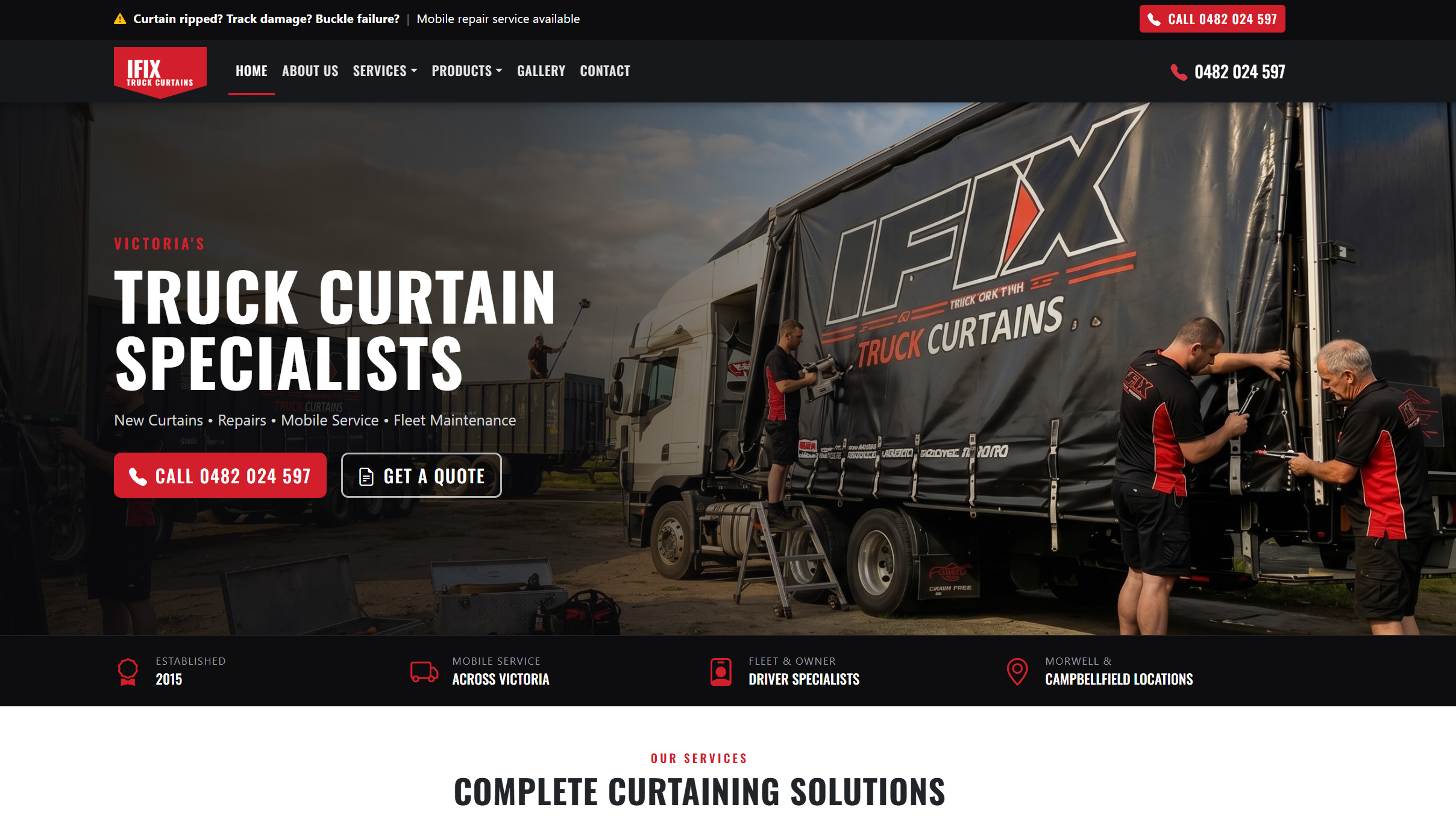
Mark runs iFix Truck Curtains. In July 2025 he opened ChatGPT, described the website he wanted, and sent me the AI website mockup it produced. It was a good picture. Dark hero, red accents, a truck with the IFIX logo across the curtain, a strip of trust badges, five service cards, reviews, two locations. He liked it, and so did I.
It was also about 1,000 pixels wide and a little blurry. And like most AI images, it looked finished long before it was true.
The Brief
Mark’s brief was the picture. Make it look like this.
Mine was to make it work: a site his team could actually be found on, called from, and update themselves, without it slowly turning into the old one. The old site looked fine, but underneath it was years of patches on a bought theme, with very little on-page SEO to show for it. I had been looking after it, so there was nobody else to blame, and a rebuild was the honest fix.
I had looked after iFix’s existing site for a few years. It was built on Salient, a bought theme, with the WPBakery page builder. Keeping it running meant chasing PHP errors from the theme framework and the caching plugin every time WordPress or PHP moved forward, and a slider that disappeared on phones. It also still carried an online shop nobody used.
I’m in Perth and iFix is in Victoria. The job ran on email, prototype links and the phone, with Amanda keeping things moving at Mark’s end.
What we found
I went through the AI mockup line by line, the way I’d audit a live site. A picture is a brief, not a source of facts, and this one had invented several.
- The wrong phone number, twice. The mockup’s call buttons said 03 5134 1393. The number customers actually ring is 0482 024 597. On a trade website the phone number is the most important line on the page, and the AI had made one up.
- An address that didn’t match. The mockup put the Morwell workshop at 68 McDonald Way. The existing site said 523 Princes Drive. Both can’t be right.
- Statistics nobody had counted. 1,000+ curtains repaired, 500+ new curtains installed, a 100% quality guarantee. They look like the kind of thing a curtain business would say. Nobody at iFix had said them – ever.
- Reviews no customer wrote. Four five-star, Google-styled reviews, each signed with the name of a transport company. They were generated with the rest of the image.
- Leftovers from the tool. The footer read “© 2024” and “Website by [Your Agency]”. The lettering on the truck’s curtain, under the logo, was nonsense.
- One screen size. A picture has no phone layout, no menu that opens, no form that sends, and nothing to say what happens on a 768-pixel-high laptop. All of those decisions were still to be made.
- The old site’s baggage. Shop, Cart, Checkout and My Account pages were live on the existing site, and its service pages sat at URLs Google had already indexed.
None of this is a criticism of Mark. Asking an AI to draw what you want is a quick, honest way to show a developer your taste. The risk is that it looks so complete that its made-up details survive into the real thing.
What we changed
- A working HTML prototype before WordPress. I rebuilt the image in HTML on Bootstrap, starting with a one-page prototype Mark could open on his phone, with jump links to each section. Those links show what a site needs to feel complete, but separate pages are what get found, so the next step was an inner-page template and a full service page. Mark saw a website, not a picture. Layout questions most mockups hide (what stacks on a phone, what stays on screen as you scroll) were answered early, when they were cheap to change.
- Then a custom WP theme written solely for his business. Once the layout was agreed, the prototype became a custom WordPress block theme with a small companion plugin. No bought theme, no page builder, no jQuery. No 3rd party or expensive plugin dependencies at all. Eight templates and 22 reusable sections, all built from WordPress’s own building blocks, so there is no builder licence to renew or break it.
- Edit once, change everywhere. Phone numbers, addresses, hours, email and social links live in one Business details screen. Change the phone number there and it updates in the header, every call button, the footer, location cards, the quote form and information Google reads.
- A page for every service. Curtain repairs, new curtains, curtain rail repairs, truck gates, roll-over tarps, barn doors, mobile service and fleet maintenance each have their own page, with the same structure: what gets damaged, what’s included, how the job works, common questions, and a quote form that stays in the sidebar as you read. Add a new service and it appears in the home page grid, the footer, related services and the form’s dropdown by itself.
- A quote form that can’t lose a job. Every request is saved in WordPress before the email goes out. If the email fails, the request is still there, flagged in red. Each one can be marked New, Contacted, Quoted, Won or Lost, so iFix can actually see where its work comes from.
- Old links still go somewhere useful. Every old service URL Google knew about now redirects to its equivalent new page. The unused shop pages return a “gone” signal so they drop out of search results instead of lingering.
- Hard to break by accident. The office logs in as an Editor, not an Administrator. They can change pages, services, photos, reviews, business details and leads. They can’t open the header, footer or templates, and they can’t choose off-brand colours or random font sizes, because the theme only offers the right ones.
- Fast and readable on a phone. Fonts are hosted on the site rather than pulled from Google. The home page loads in 24 requests on desktop and about 570 KB on a phone. Automated accessibility testing (axe-core, WCAG 2.1 AA) found no violations on the home, about, service, contact and gallery pages at desktop and phone widths.
- Tested where people browse. The quote sidebar on service pages was scrolling inside itself on 1366 × 768 laptops, so that was fixed and checked at five screen sizes before launch.
- A team, not a sole trader. The copy presents iFix as the crew it is – no longer a sole trader.
What I left out matters as much. The invented statistics aren’t on the site. Reviews live in one shared block, so each one can be checked against a real customer, or swapped for a Google review, in a single edit that updates every page.
The result
The new site went live in November 2026, moved across from its staging server. What can be measured now:
- one phone number, correct everywhere, editable in one place
- eight service pages, each with its own address
- every old service URL redirected, with dead shop pages retired
- no page builder, no bought theme and no jQuery, so updates don’t wait on anyone else’s code
- no automated accessibility violations, at desktop and phone widths, and
- every quote request saved, counted and tracked, from day one.
Mark’s picture is still recognisable in the finished site. That was the point. Everything a picture can’t do had to be built underneath it.
Enquiries are the real test. I’ll add the first three months of quote requests and Search Console figures here in early 2027.
Using AI to mock up your website? Do it.
I’d rather start from an AI website mockup than a list of sites you like. In a few minutes, ChatGPT, Gemini or any image tool can show your developer the colours, the mood and the layout you have in your head, and that’s the hardest part of a brief to put into words.
The trick is to treat the mockup as a picture of your taste, not a picture of your business. The AI fills every gap with something plausible, and plausible isn’t the same as true. Send these with it and your developer can build the real thing much faster.
What to send with your mockup
- The prompt you used. The prompt says what you asked for. The image will only show what the AI guesses.
- Your real contact details, typed out. Phone, email, address and hours. Never let anyone copy them off a picture.
- Your services, in your words. A line or two on each job, and mention the type of job you most want more of.
- Real photos. Your work, your crew, your vehicles, your premises. Phone photos are fine. AI photos get the lettering wrong? Customers will notice.
- Real reviews, and a link to your Google Business Profile. Never use the ones in the mock-up.
- What you love, and what you don’t care about. “Keep this layout and these colours, ignore the numbers” saves a week of emails.
- Who will update the site. It changes how the site should be built.
What a mockup can’t show is everything that happens after someone lands on the page: how it works on a phone, how Google finds it, how fast it loads, where an enquiry goes, and who can change a phone number in two years’ time. That part is the developer’s job, and it’s most of the work.
Send me your mockup
Made an AI mockup of your website? Let’s build the real thing.
Send through your mockup and the prompt you used. I’ll go over it the way I went over Mark’s: what to keep, what the AI invented, and what it will take to build it properly. You’ll get a clear, fixed quote, and you’ll deal with me the whole way through.